
CH 02 · Quotes & contracts
Send the quote.Get a yes.
Price the show in three steps, with your logo and terms. The client opens a personal link, no account and no app, and accepts, declines or asks. You get a notification for each answer, and the yes becomes the gig.
- Priced in three steps
- WhatsApp, text or email
- Accept on a link
- Six languages
 CH 02 · Quotes & contracts
How it works
From a price
to a booked date.
01
Price it
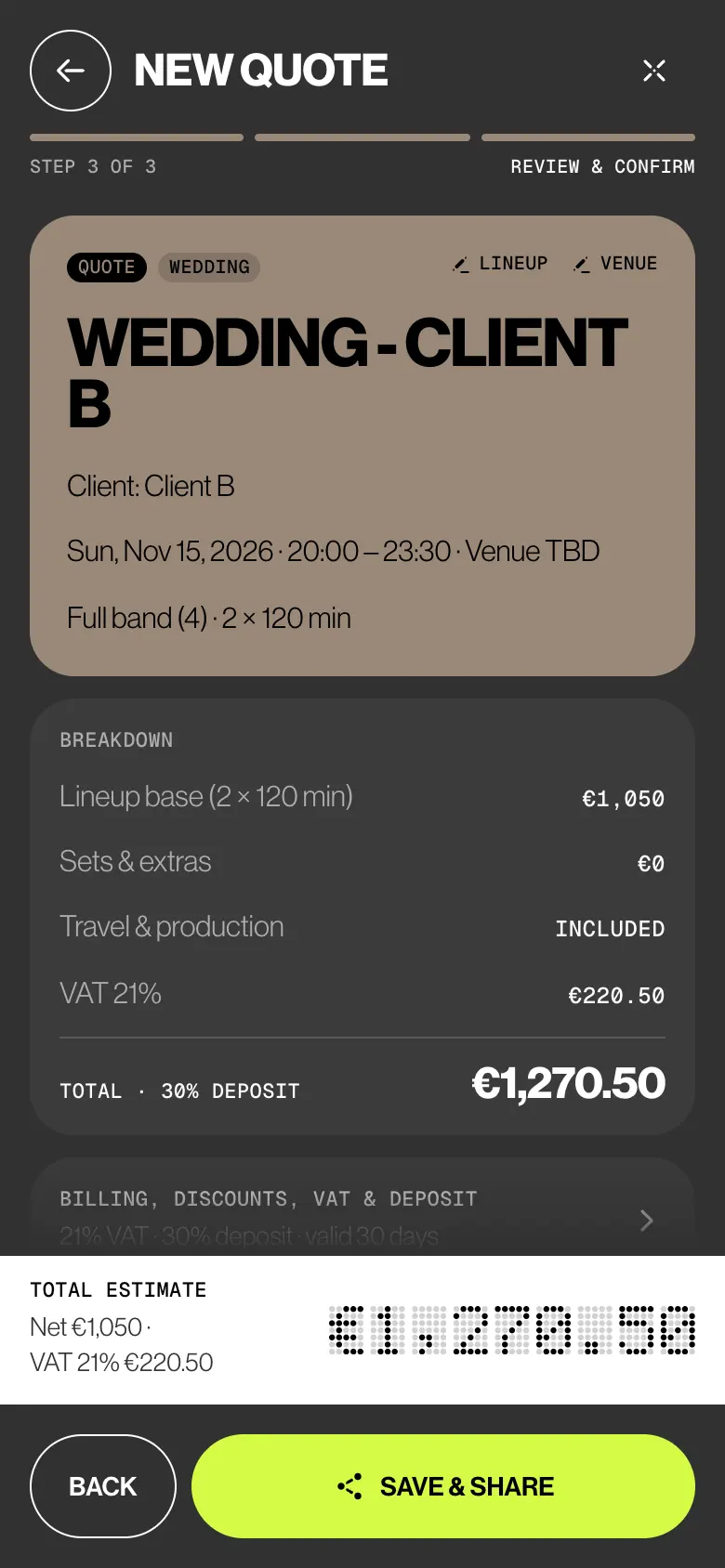
Tap Create, then New quote. Client and event type, the lineup from your pricing sheet, then date and venue. Step 3 shows the breakdown, and the Total estimate updates as you type.
02
Send it your way
Save & share builds the PDF. Pick the client language, then WhatsApp, Text message, Email or Copy message & link. Each sends a personal link with the total and your name.
03
The client answers
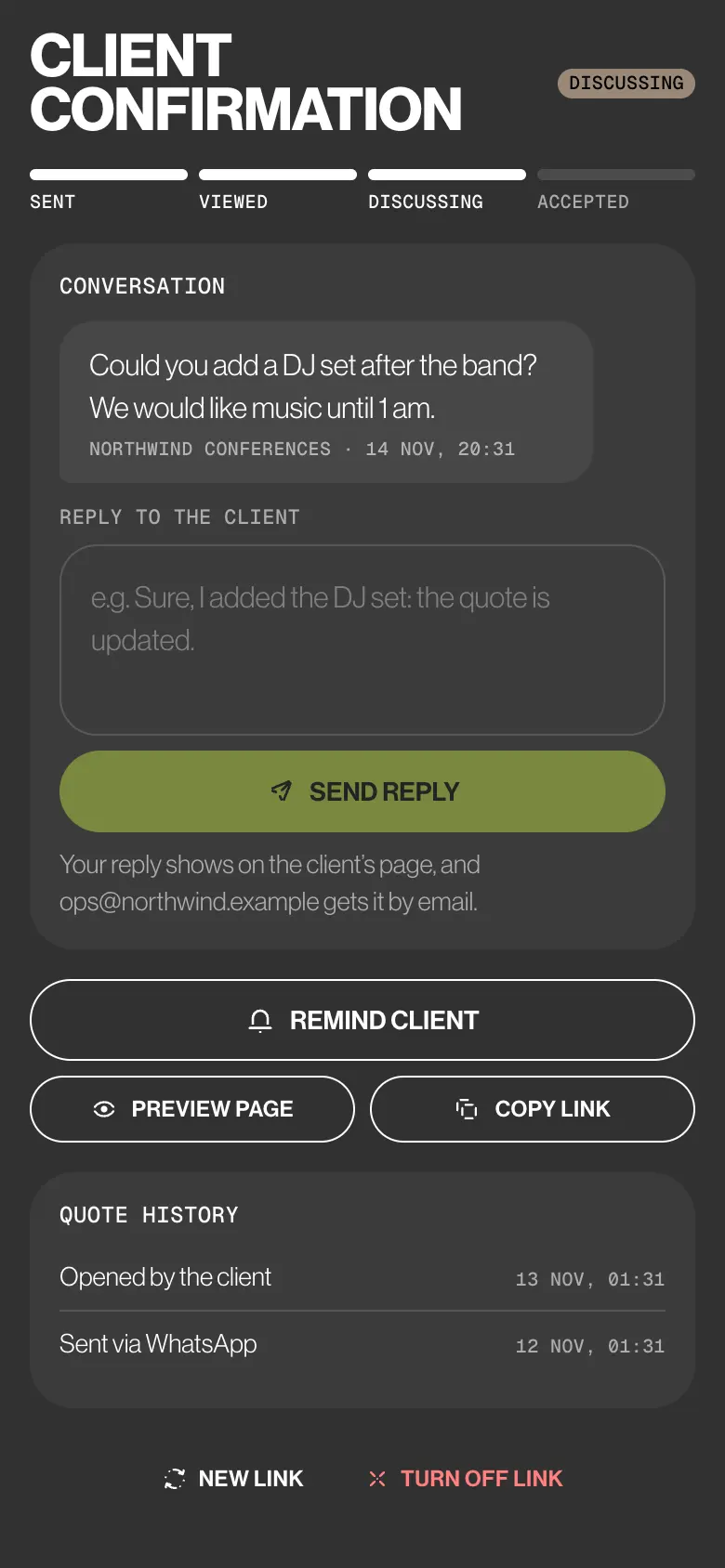
On their page they accept with their name, decline, or write to you. Client confirmation follows the link: Sent, Viewed, Discussing, then Accepted or Declined. You reply from the quote.
04
Book it, sign it
Tap Create gig from quote and the date lands on the lineup’s calendars, each musician with their own fee. Prepare contract fills in the gig, client and date. Mark as signed when the copy comes back.
Try it
Be the client.
Tap yes.
This is the page behind Leo’s link for Client A — Wedding. Ask a question, then accept with your name, and watch the quote on Leo’s phone move from Sent to Accepted.
ClientThe personal link
Velvet Static · Quote Q-2026-0014
Client A — Wedding
Hi Client A, Velvet Static sent you this quote. Have a look, then accept it, decline it or ask a question.
- Date
- Saturday 21 November 2026
- Time
- 20:30–00:30
- Venue
- Villa Necchi
- City
- Milan
- Guests
- 140
- Line-up
- 5 musicians
What’s in the quote
- MAIN BAND5pc band · two sets€2,100.00
- MUSICAL PRODUCTIONSound and lights€300.00
Subtotal€2,400.00
VAT 22%€528.00
Total€2,928.00
Deposit 25%€732.00
Valid until31 Oct 2026
Does it work for you?
Type your full name to accept.
Tick the box to confirm.
Your name, the date and the time are saved as your acceptance of this quote. It is not a legal signature: if a contract is needed, Velvet Static will send it to you to sign separately.
Decline the quote
Questions or changes?
Write to Velvet Static. Their answer appears on this page: keep the link to come back.
Write a message first.
BandWith
AdminLeo M. · the quote in the app
Who sees what
Admins make the deal.
Members play it.
Quotes and contracts hold the client and the price, so they stay with admins, in the app and in the database. Members hear about a quote only when you ask the lineup.
| What | Admin | Member | Deputy |
|---|---|---|---|
| Creates, edits and sends quotes | Yes | No | No |
| Sees the client, the quote total and every fee | Yes | No | No |
| Gets an availability check before the client says yes | Asks | With their own fee | No |
| Sees the gig once it’s confirmed | Yes | With their own fee | Their request only |
| Creates, sends and signs off contracts and riders | Yes | No | No |
The small things
The small print,
taken care of.
- In the client’s language
EN, IT, ES, FR, DE or PT for the PDF, the message and the client’s page. Your app stays in yours, and the choice is remembered for that client on this device.
- The date is held
Saving a quote puts a tentative event on its date in the admins’ calendar while you wait.
- Fees stay inside
The client sees the lineup as one line, never what each musician earns.
- Ask the lineup first
Turn on Ask the lineup now and each musician gets an availability check with their own fee.
- Edit after sending
The client’s page switches to the new version. Send the update tells them.
- A yes, then a signature
Accepting records the typed name, the time and the version the client saw. It isn’t a legal signature: the contract PDF ends with two signature lines, and you tap Mark as signed when it comes back.
Learn it
The Guide,
step by step.
Six short articles in the BandWith Academy, in six languages.
- Create a quoteA priced proposal in three steps.
- Share a quoteA personal link or the PDF, by any channel.
- The client’s pageWhat the client sees, and how they answer.
- Follow upReplies, reminders and the link’s history.
- From quote to gigPut the accepted date on everyone’s calendar.
- Create a contractA performance agreement, filled in from the gig.