CH 04 · Rehearsals & polls
Find the datein one round.
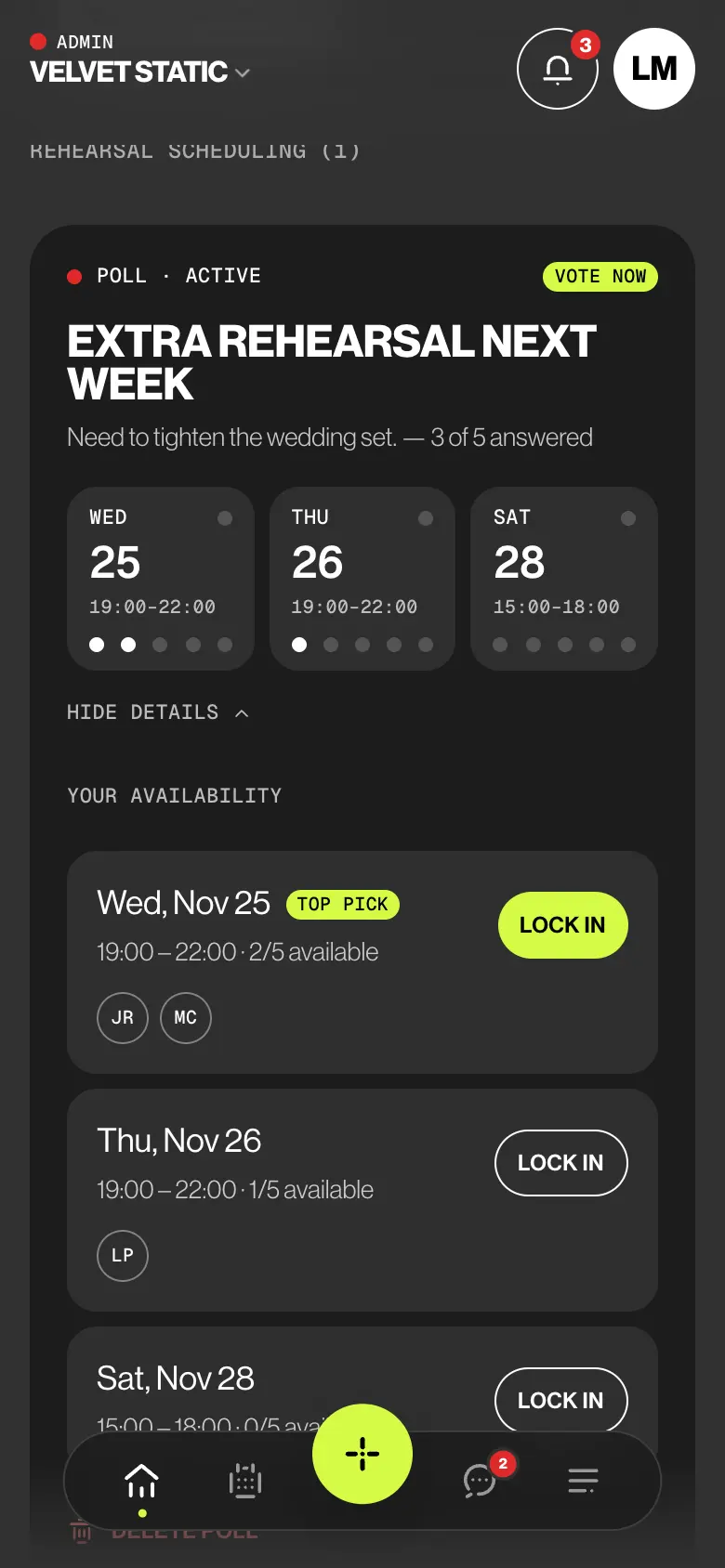
Offer the band a few dates. Everyone taps the ones they can make, an admin locks in the winner, and the rehearsal is in the calendar with the room, the cost and the songs to work on.
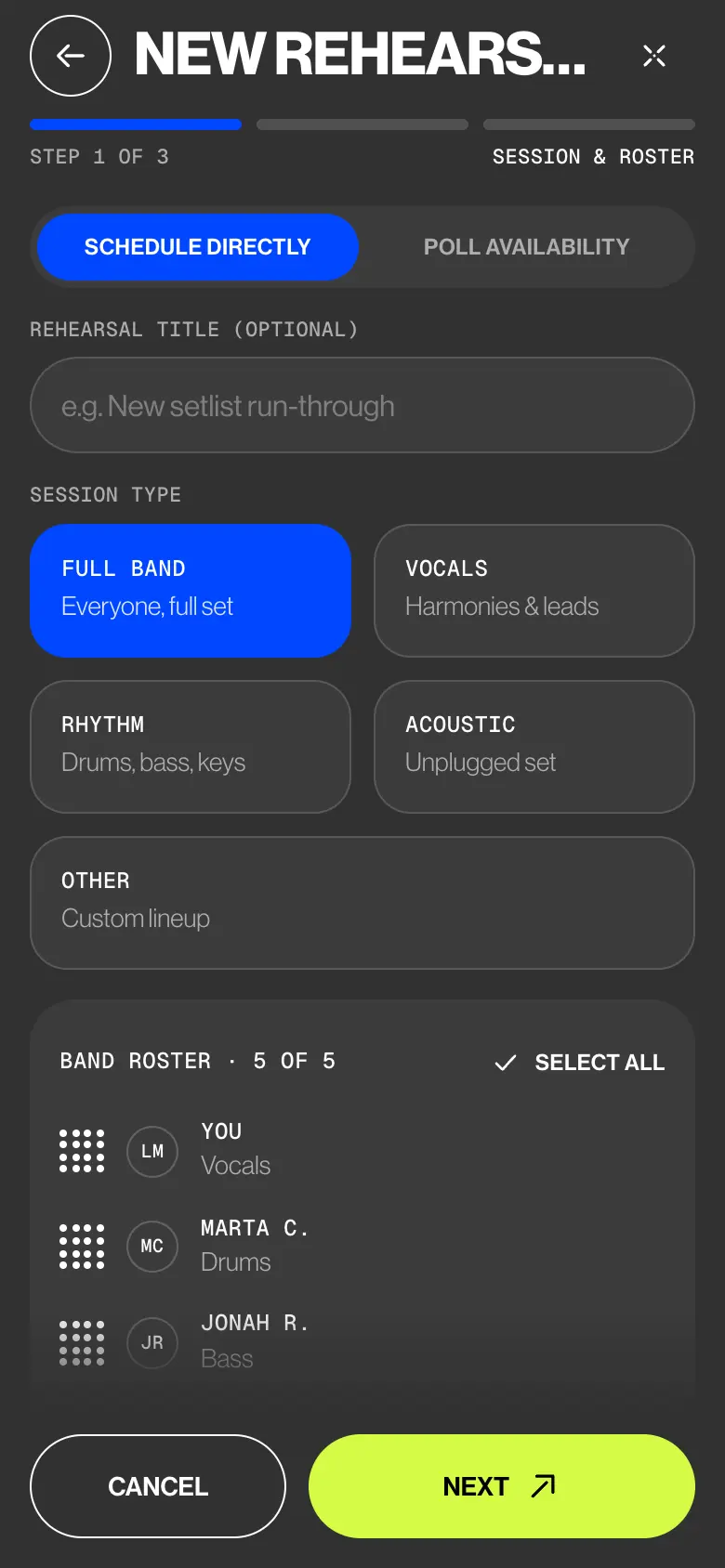
- Schedule directly
- Who votes
- Vote by
- Focus songs
 CH 04 · Rehearsals & polls
How it works
From a question
to a date.
01
Schedule it, or ask first
Tap Create, then New rehearsal. If you know the date, stay on Schedule directly: session type, roster, room, time. If you don’t, switch Scheduling mode to Poll availability.
02
Offer a few dates
Leave out anyone who isn’t needed under Who votes. Add the room, its cost and the focus songs, then the dates: each day shows how many members are free. Set a vote-by time and tap Publish poll.
03
The band votes
Everyone asked gets a push. The poll sits on Home and at the top of the Calendar. Tap each date you can make, tap it again to take it back, or None work if nothing fits. Votes update live.
04
Lock it in
Details · Lock in lists every date with who can make it, and the Top pick. Tap Lock in, check the place, then Confirm & create event. The rehearsal is created and the poll closes.
Try it
Three dates.
One rehearsal.
Leo wants an extra rehearsal before the wedding. Tap the dates you can make, then take Leo’s phone and lock in the top pick.
Who sees what
Admins schedule.
Members answer.
Members propose, vote and answer each rehearsal. Deputies are asked for gigs, not rehearsals, so band rehearsals and polls stay with the band.
| What | Admin | Member | Deputy |
|---|---|---|---|
| Creates, edits and deletes rehearsals | Yes | No | No |
| Proposes a rehearsal to the admins | Creates it | Once a week | No |
| Publishes a poll and locks in a date | Yes | No | No |
| Votes in a poll | Yes | When invited | No |
| Answers GOING or CAN’T, drops out | Marked going | Yes | No |
| Chooses the focus songs | Yes | No | No |
| Sees the room cost | The total | Their share, in a poll | No |
The small things
Less back
and forth.
- Members propose, admins decide
A member taps Propose rehearsal with a topic and the days that suit them, once a week per band. An admin turns it into a poll with Build poll, or declines it with a reason.
- Free counts, not reasons
Each day in the builder shows how many members are free, from their calendars. Never who is busy, or why.
- The room, split
Enter the room cost and each person’s share is worked out. In a poll members see only their share; the total stays with the admins.
- Songs and prep tasks
Pick focus songs from the repertoire or a saved setlist. Add tasks like Bring chord charts, ticked off on the rehearsal page.
- Weekly, biweekly, monthly
One rehearsal with a repeat rule, shown in the calendar about four months ahead. One roster and one answer for the series.
- A vote-by time
Pick a day before the first date and a time. Then voting closes, the poll shows Voting closed, and an admin locks in a date.
Learn it
The Guide,
step by step.
Six short articles in the BandWith Academy, in six languages.
- Create a pollOffer a few dates and publish them to the band.
- VoteTap the dates that work, or say none do.
- Lock in a datePick the winner and create the rehearsal.
- Create a rehearsalSchedule it directly when you know the date.
- Propose a rehearsalAsk the admins for one, with the days that suit you.
- The rehearsal pageAttendance, focus songs, tasks and the room.