
CH 07 · Stage mode
One song.Every phone.
On gig day the whole band opens the same black, glanceable screen: run of show, setlist, chords or lyrics. The leader moves to the next song and every phone follows.
- Lead
- Follow
- Visual click
- Works without Wi‑Fi
 CH 07 · Stage mode
How it works
Four moments
on stage.
01
Go live
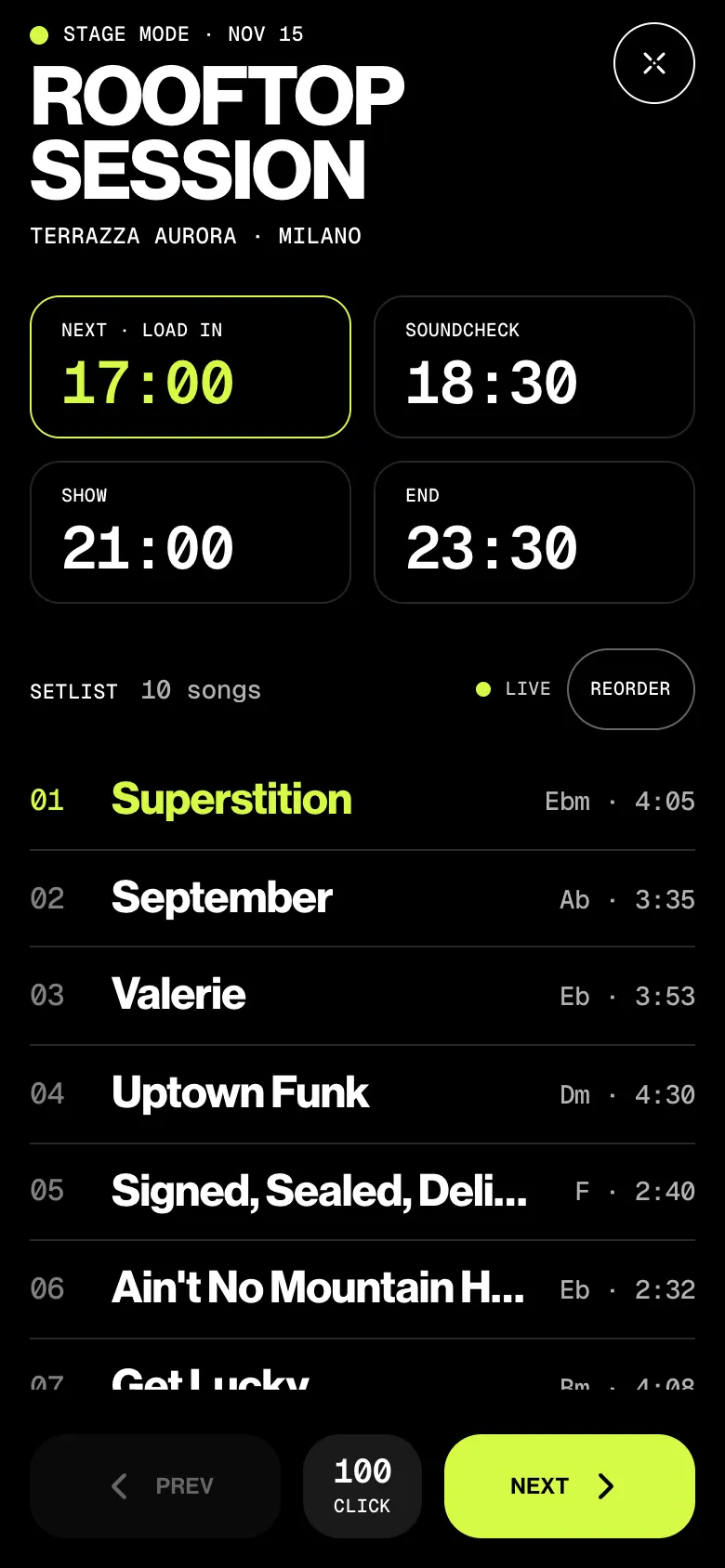
Open the gig and tap Play, or Go live from Home on gig day. The run of show sits on top: load in, soundcheck, show, end. The next one is lit.
02
The band follows you
As admin you lead: tap Next, Prev or any song and every phone moves with you, with the lyrics, chords or structure of the song. A member can look ahead alone, then tap Follow leader to catch up.
03
Count it in
Start the click and a glow flashes around the edge of every phone on the beat, brighter on one. It’s visual only, no sound, and the phones stay within about 20–40 ms of each other.
04
No signal? Still in sync.
Open the gig once while online and the setlist, charts and the gig’s Bluetooth key stay on the phone. In a basement with no signal, the leader’s phone keeps the band on the same song over Bluetooth. No pairing.
Try it
You lead.
They follow.
This is Leo’s phone, and the band’s. Move the song, strike one off, start the click. Then pull the venue Wi‑Fi and watch who keeps up.
AdminLeo M. · Bass · leads
Who sees what
Admins lead.
Members play.
Stage mode is for the band’s own gigs, and as Live mode for its rehearsals. Deputies get the gig’s times and their part, not the band’s setlists.
| What | Admin | Member | Deputy |
|---|---|---|---|
| Opens Stage mode on a gig, Live mode on a rehearsal | As leader | As follower | No |
| Moves the current song for everyone | Yes | No | No |
| Reorders the set live, strikes songs off tonight | Yes | No | No |
| Starts the click | On every phone | On their own phone | No |
| Steps through songs alone, then follows again | Leads | Yes | No |
| Transposes for their own screen | Yes | Yes | No |
The small things
Made for
a dark stage.
- The screen stays awake
For as long as Stage mode is open. Keep the leader’s phone unlocked: a locked leader stops the band’s sync.
- Strike a song tonight
Tap − at the end of a row. Prev and Next jump over it, on every phone. The gig’s setlist keeps it. Hold and drag a row to reorder.
- Rehearsals too
On an upcoming rehearsal it’s Live mode: the focus songs, chords, the click and the leader. No run of show.
- A secret key per gig
Only the band’s active members get it. Only phones with the key find the leader over Bluetooth.
- Your key, your screen
Transpose for yourself with − key +. Nobody else’s chart changes.
- A click for the eyes
Right for a count-in and a tempo reference, not for in-ears. It runs from the song’s BPM, and needs the internet: it isn’t sent over Bluetooth.
Learn it
The Guide,
step by step.
Six short articles in the BandWith Academy, in six languages.
- Stage modeWhat’s on the screen, and how to open it.
- Lead the bandMove the song, reorder live, strike songs off.
- Follow the leaderLet the admin turn your songs, or step alone.
- Use the clickA visual metronome in time across the band.
- Without internetBluetooth sync, and what to do before the gig.
- On every devicePhones, tablets and each Duo posture.